Execution Review: how to keep projects on-track
Intro: too many projects, not enough time
At some point in Column Tax's lifecycle, we grew such that as co-founder & CTO (and responsible for Engineering, Product, and Design) I wasn't personally leading every project. At that point, I hired Ryan Seekely as Head of Engineering who helped us implement a system called Execution Review that allowed us to steer & debug dozens of simultaneous projects. This blog post describes why you might want a system like that, and how to implement it.
Why do you need to track execution?
As the Head of EPD (or Head of Engineering or an Engineering Manager), you're in charge of delivery. That means, at the end of the day, every project is your responsibility, and you're on-the-hook for overall team speed & project outcomes.
But there are too many projects for you to personally lead every single one yourself. That means you need some way to keep track of every project and be able to step in to debug & fix if a project is not going well.
You want to make sure you & your peers (Engineering, Product, Design) are all on the same page, handing off well between you, and working together to solve problems when they arise.
Lastly, you need to represent progress in a legible way to your stakeholders (the CEO, etc.).
Enter, Execution Review.
How to run Execution Reviews
Execution Review is a weekly forum where you review every project and your overall operational metrics. You see what's moving, what's stuck, what changed, and then make decisions and help as-needed.
The setup: Projects & Status Updates
In order to set this up, you need some central repository to track every project/workstream that's happening or planned. I usually consider a project anything that takes >= 2 weeks of time to do (since anything shorter won't be worth tracking on a weekly basis). You can use a spreadsheet, Notion/Coda, Linear, etc., the exact format doesn't matter as much as the content and that it's easy to keep updated.
Projects
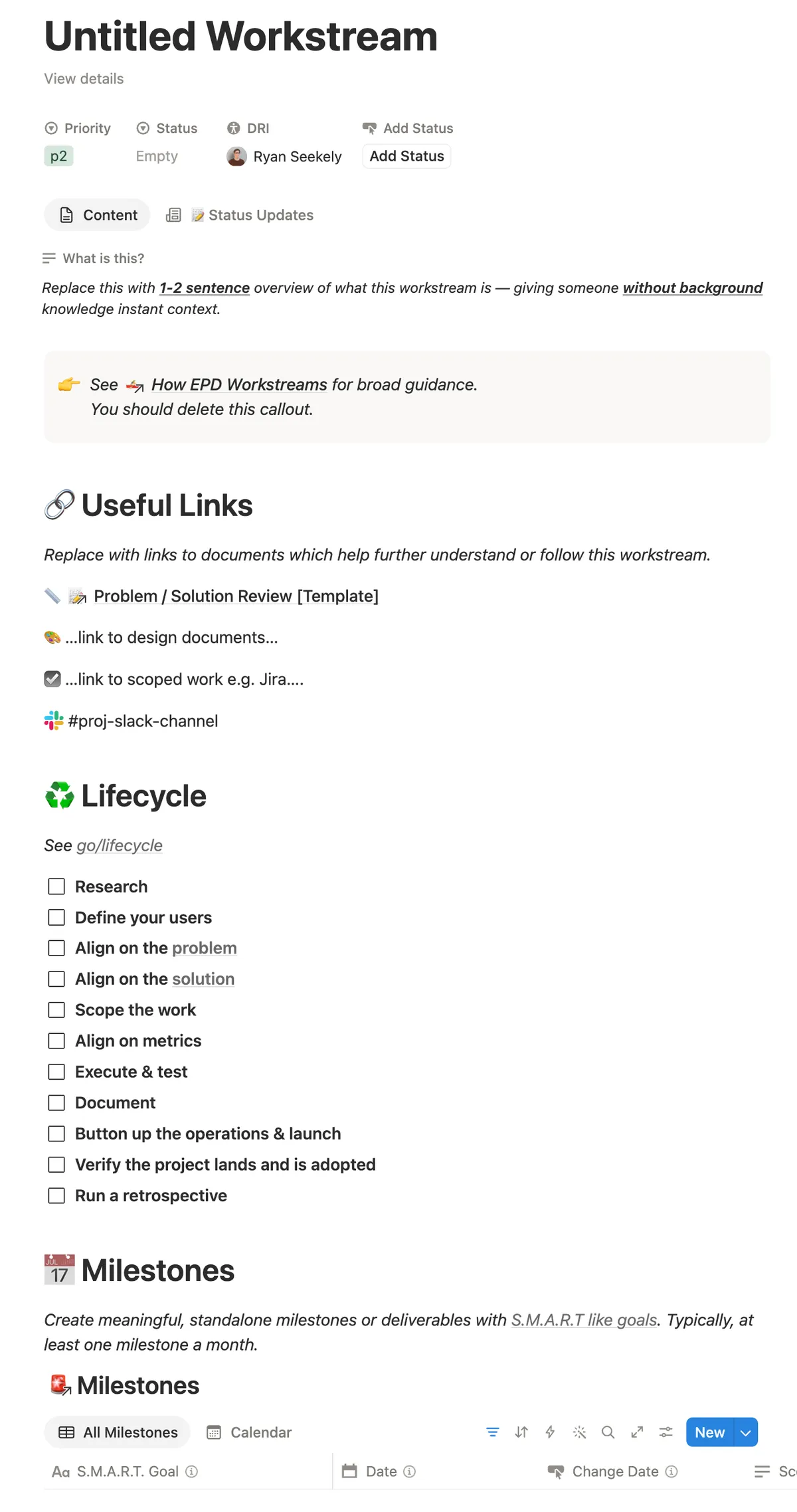
Each project should have the following characteristics. After agreeing on the Problem & Solution, each project should have Milestones with dates attached. A milestone is a concrete sub-goal. Write milestones & goals such that a neutral third-party observer could judge if the goal was achieved or not.
I like to ask projects to create a central repository in whatever document system (Google Docs, Notion/Coda) that includes some basic info about the project (who the DRI1 is, the TL;DR, goals) and then includes as sub-pages all of the relevant documents: Problem & Solution Reviews, designs, technical design docs, meeting notes, etc.
Here's the Project overview template I've used:
Status Updates
Once a project/workstream has been set up with milestones, you can now ask the DRIs of each project to write a weekly status update on the project. This is the core of the Execution Review workflow.
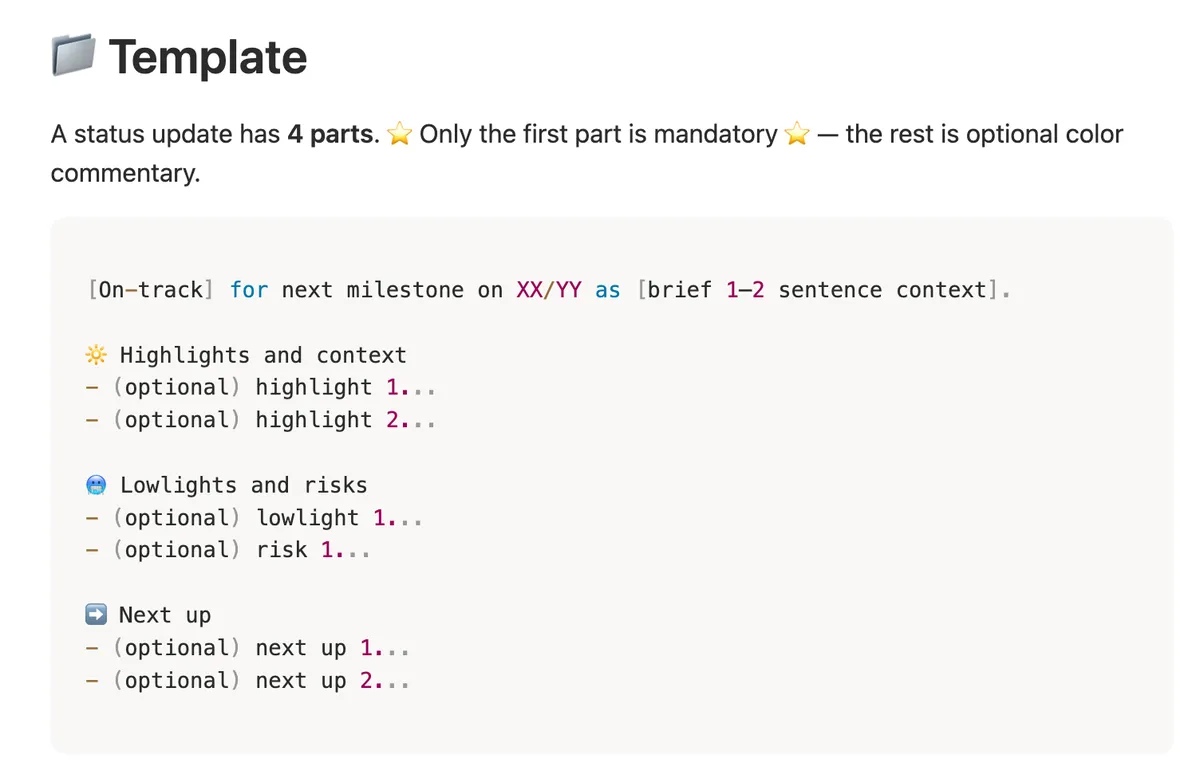
A status update should take at most 5-10 minutes to write and contain the following (with instructions for the Status Update author):
- A top-level status: On-track, Needs Attention, Off-track
- A one-sentence summary of where the project is against its milestones
- This should state the status of the workstream relative to the next milestone, plus a pinch of color on why it's in this state (e.g. what got done last week in a few words, or why it needs help).
- If the workstream Needs Attention, include the suggestion/ask to get it back on track, such as:
- Changing the date of a milestone
- Changing the goals of a milestone
- The date by which we'll know if the workstream is back on track
- Adding folks to the workstream
- Optionally: Highlights and context
- Neat things that happened since the last update and additional context those watching the workstream may like to know.
- Optionally: Lowlights and risks
- What did not go as well as expected, even if seemingly innocuous. This provides useful signal for those who are looking to help.
- If the risk is something that can be addressed on your own, include the current plan to eliminate it and when we expect to know the resolution.
- If the risk needs help from outside the workstream, include an explicit ask from the organization with laid-out options and tradeoffs.
- Next up: a reminder of the upcoming milestones & dates
More notes on the Needs Attention and Off-track statuses:
- On-track: is the default, most-obvious status; this means the team is set to achieve the project's next milestone by the milestone's set date
- Needs Attention: this is the status to use to propose a change to the milestone (date, scope, people, or dependency).
- Use this status the moment you know the milestone as currently written will not land. If the milestone is changing, it goes here even if you're confident the new plan will work.
- The update must contain the proposed change explicitly. No proposed change in the update means wrong status: either nothing is changing (On-track) or you've run out of moves to propose (Off-track).
- Off-track: use this status if the next milestone will be missed and you have no path forward you can execute on. Even changing the date doesn't help. This is an escalation: you're asking the org to intervene. If you have a fix to propose, use Needs attention.
Status updates should be:
- Concise & to-the-point: they really should not take more than 5-10 minutes to write!
- If someone only reads the first sentence, they should walk away with the most important part of the update. The author should use plain language and describe the state of the workstream right away; don't bury the lede that a workstream needs attention or is off-track halfway through the update.
- Mindful of the audience
- A status update is typically read most by those not on the workstream. Include sufficient context around what things are or why something is relevant or important. If you mention a technology, say what it is. If you mention you accomplished a task, say why it matters to the workstream.
- Only as long as they should be
- Clear about next steps
- In the simple case, the update should include a preview of the upcoming actions or work. If the workstream needs help, it should include an explicit ask: what you need to get the project back on-track or your plan for fixing it in the next week.
Weekly Schedule
I usually ask for the status updates to be done by EOD on Monday so that folks have serious time to read & digest the updates and provide substantive comments on Tuesday morning before the Execution Review meeting. This also avoids folks having to scramble to write updates over the weekend.
Status Update Template
Here is the Status Update template I've used:
Status Update Examples
Here's an example of a bad Status Update:
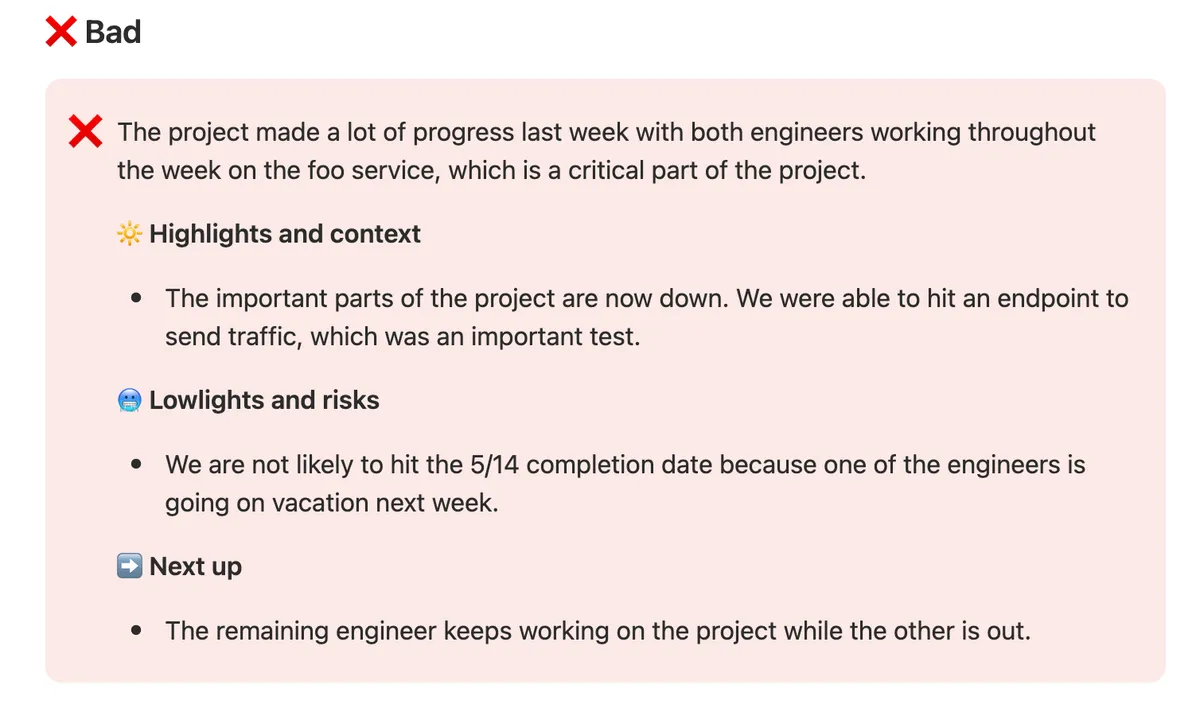
- Buries the lede. This workstream needs help, but that isn't clear until the lowlights section.
- Does not give clear next steps. The workstream will not hit its milestone but does not prescribe or ask for a remedy.
- The status update, highlights, and next up are devoid of intent or context. Why does the audience care about each sentence? What is the foo service and why is it important? What does "the important parts of the project are now down" actually mean? Did the remaining engineer continuing to work need to be said at all?
And here are a couple examples of good Status Updates:
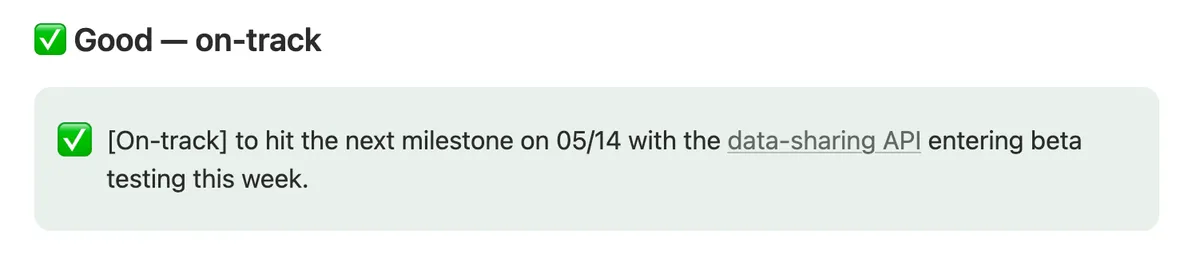
- This update is short and to the point
- It links out to more information about the data-sharing API should the audience be interested.
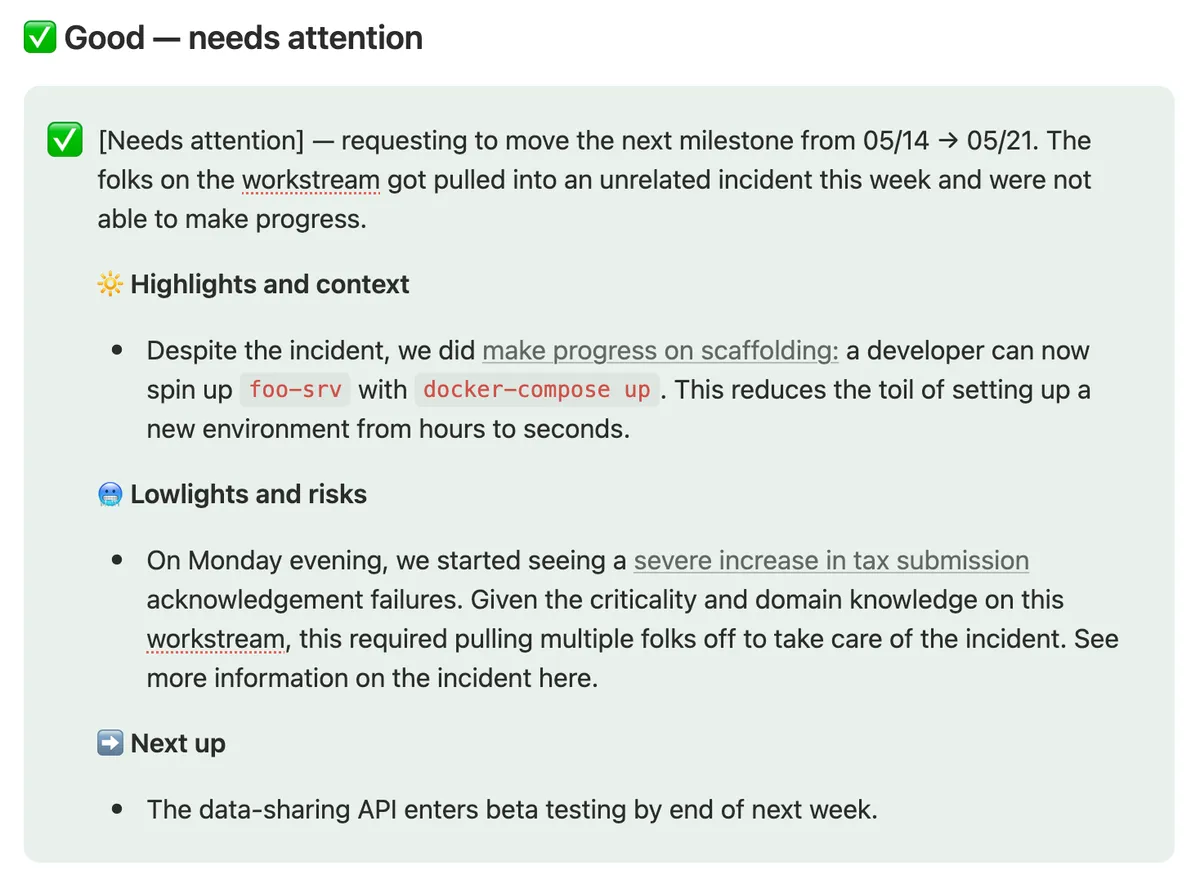
- Does not bury the lede on the workstream needing help.
- Clearly states the request to get the workstream back on track.
- Shares additional context on why the milestone will be missed.
- Highlights and lowlights are interesting to those outside the workstream and provide adequate context, both in the sentences themselves and via links to more information.
The Execution Review meeting
Once you have Projects organized/tracked and DRIs writing weekly Status Updates, you can hold your Execution Review meeting. This is the key forum by which you ensure that your team is aligned on the state of the world and is able to debug and help things workstreams are going awry.
I suggest including your leads by-default. At a small company, this might be the Heads of Engineering, Design, and Product. At a larger company with split pods, this might be the lead of each pod. Also strategically include DRIs of important workstreams as-necessary (and dismiss them if they're no longer needed in the meeting).
Before the meeting (I suggest Tuesday mid-morning, e.g. 10am), have every attendee read (and comment) on the Status Updates. Leads and DRIs should also propose agenda items or surface "Criticals".
In the meeting, I used this standard agenda:
- Guidance
- A reminder of our company top-level goals and prioritization framework (repetition doesn't spoil the prayer, so I say this every week even if it seems absurd how often I feel like I'm repeating myself)
- Top of mind
- Pass downs of important company info. Things like important upcoming dates, updates on important sales deals & conversations, partnership updates, hiring, etc.
- Follow ups
- Check in on the delegations/to-dos from last week's meeting
- Criticals
- Items (usually added by members of the team) which need to be addressed, triaged, prioritized outside of the normal planning & execution cycle
- Workstreams
- Go through each workstream's Status Update (usually starting with the Off-track and/or Need Attention updates). For each update:
- Ask questions of the DRI, ensure we understand the state of the execution world correctly
- Approve/deny/edit any request that a DRI has made via a Needs Attention status update (e.g. moving a milestone date, adding people, changing scope
- Debug any Off-track projects by digging in to understand what's off-track and work together with your leads to find solutions
- If necessary, delegate more-complicated follow ups to a DRI to handle async
- Go through each workstream's Status Update (usually starting with the Off-track and/or Need Attention updates). For each update:
What's nice about this format is that you can often make decisions live on the call to debug projects: changing scope/dates, moving people off/on to a project, or helping decide other issues. For anything more complicated, you can delegate the task to a person and have a built-in mechanism to ensure it is done by next week.
This meeting should not be a simple readout of status updates: only spend time as-needed to understand, debug, and/or decide.
Here is the meeting/agenda template I've used:
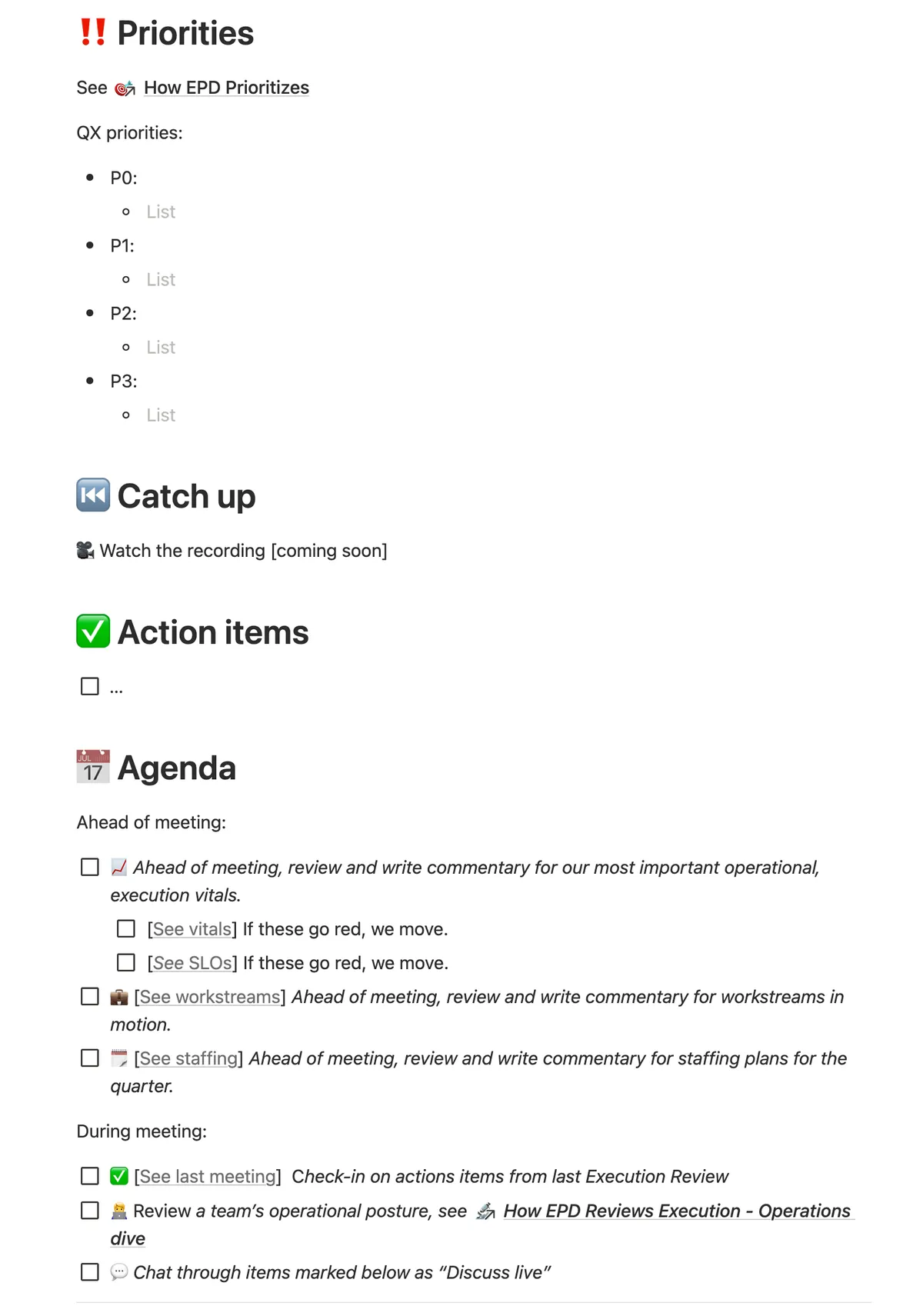
By running these meetings well, you should have an EPD leads team that feels really on the same page about what's happening on the team/at the company and working together to solve problems and get things done. When it's working well, it feels great.
Thanks to Ryan Seekely & Hannah Squier for reading and providing feedback on drafts of this essay.
To get notified (extremely rarely) when I publish a new post, subscribe here:
Side note, your project needs to have a DRI.↩